Back to products

KEYTECHProductsBABEL OPS

AI MAINTENANCE AUTOMATION

BABEL
OPS

BABEL OPS is a maintenance automation platform in which AI analyzes the system change requests your team registers and implements them as code, connecting deployment, review, and handling history in a single operational flow.

We maintain this website itself through BABEL OPS tickets

BABEL OPS dashboard — ticket handling metrics, registration and processing trend charts, and a list of recent deployments
The dashboard shows ticket handling status and recent deployments together.

WHY BABEL OPS

Fewer repetitive change requests, with judgment left to people.

  • Repetitive requestsEven small requests such as copy and screen changes repeatedly consume developer time for analysis and edits.
  • Scattered processRequests, code changes, deployment, review, and history are spread across different tools and people.
  • Operational blind spotsHandling status and the rationale behind each change are hard to check in one place, which increases the management burden on your team.
  • Incremental transitionYou can apply AI to the maintenance flow first, without rebuilding existing systems from scratch.

CONNECTED LIFECYCLE

Connected end to end, from ticket registration to completion.

Even when a hold, error, rejection, or rollback occurs during handling, your team reviews it and the work continues as a new handling round, with the change history preserved.

  1. 01Request registrationRegister the target system, the reference screen, and the requested change as a ticket.
  2. 02AI analysisAI analyzes the source of the target project together with the request.
  3. 03Code handlingThe change request is implemented as code and a Git commit is created.
  4. 04Deployment decisionYour team reviews the result and decides whether to apply it to the target system.
  5. 05ReviewCheck the applied result and either approve it or request further work.
  6. 06History completeEach handling round, commit, deployment, and rollback is recorded.

PLATFORM CAPABILITIES

Core capabilities, shown in the actual product screens.

Register multiple projects and manage their maintenance with AI from a single console. The screens below are actual BABEL OPS product screens.

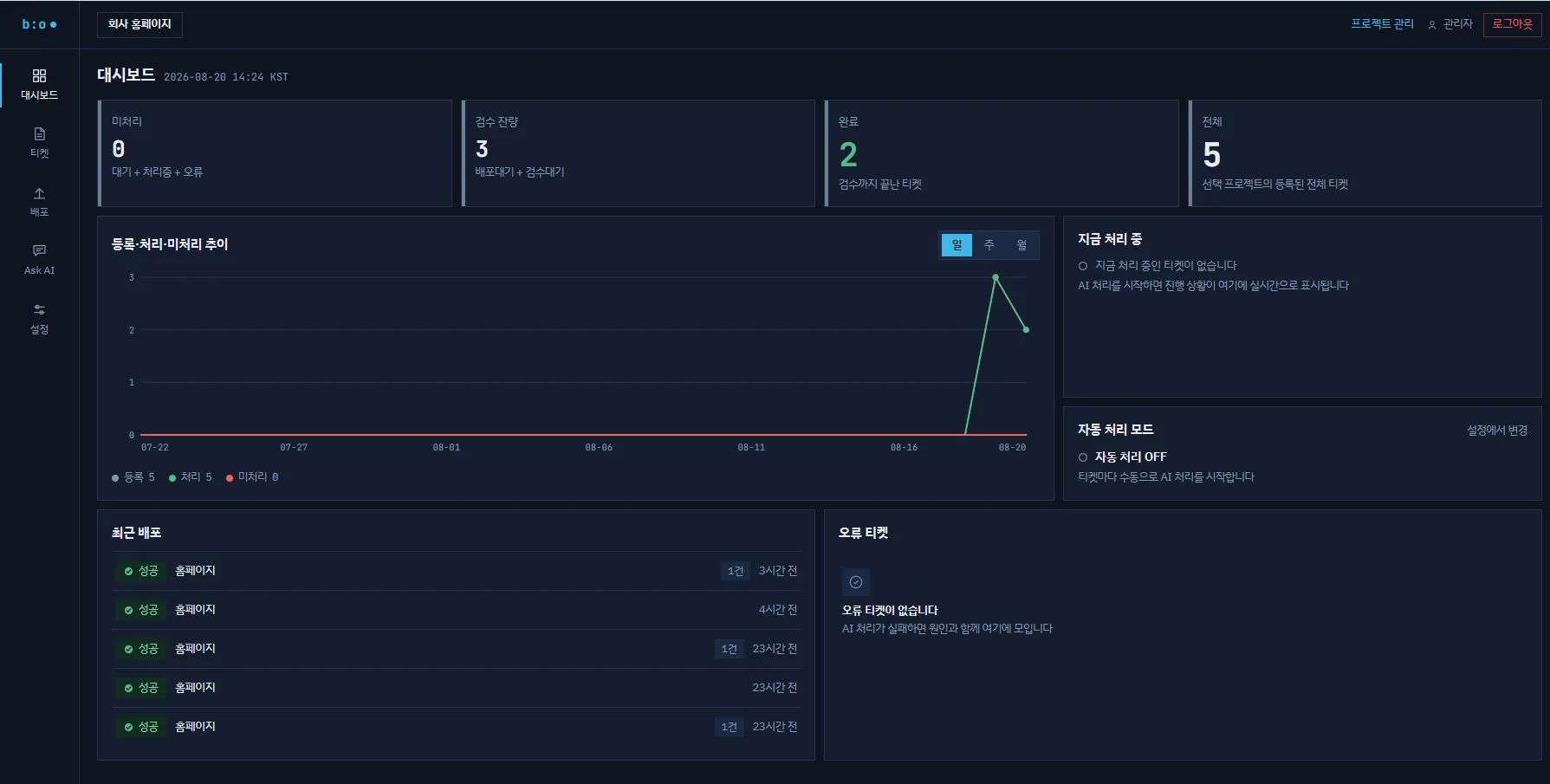
BABEL OPS dashboard — open, pending-review, and completed ticket metrics, registration and processing trend charts, and recent deployments and error tickets
01

Dashboard — Tickets, deployments, and errors at a glance

It summarizes ticket counts by stage — open, pending review, completed — along with registration and processing trends and the work currently in progress. Recent deployment results and error tickets appear on the same first screen.

  • Ticket totals by stage and registration, processing, and open-ticket trends
  • Recent deployment results and error tickets in one view
  • Automatic handling mode status
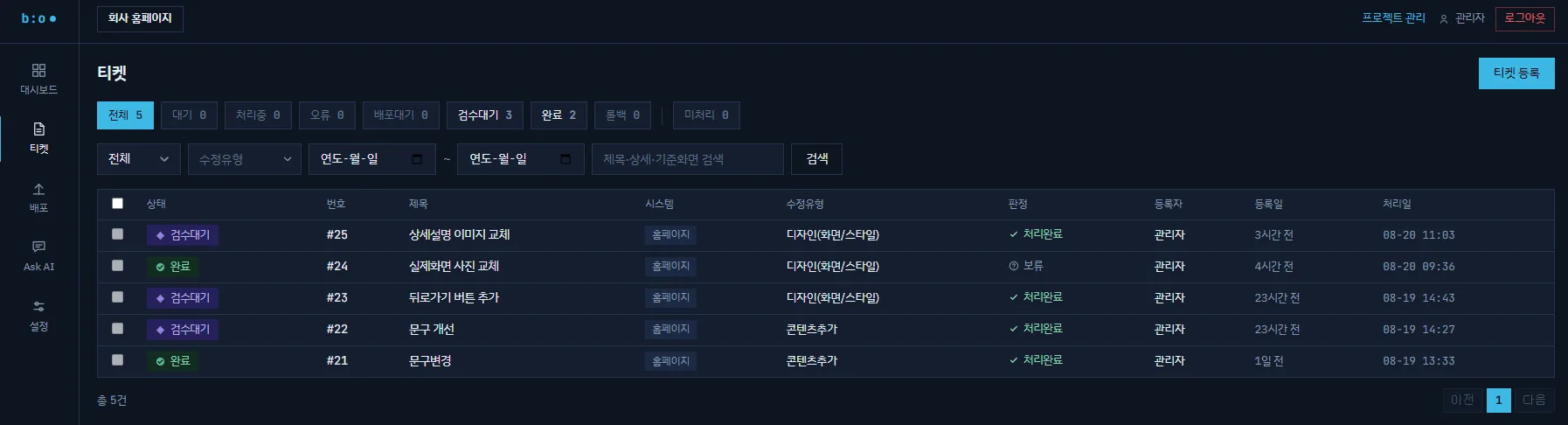
BABEL OPS tickets screen — status filters and a ticket list with change type, AI decision, registration date, and handling date
02

AI ticket handling — Register a ticket and AI analyzes the source and implements it

Register a request as a ticket — from screen copy edits to feature changes — and AI analyzes the source of the target project and implements it as code. Tickets are tracked by status: waiting, in progress, awaiting deployment, awaiting review, completed, and rolled back.

  • Filters for status, change type, period, and keyword
  • AI decision and handling time recorded per ticket
  • History tracked from registration through handling
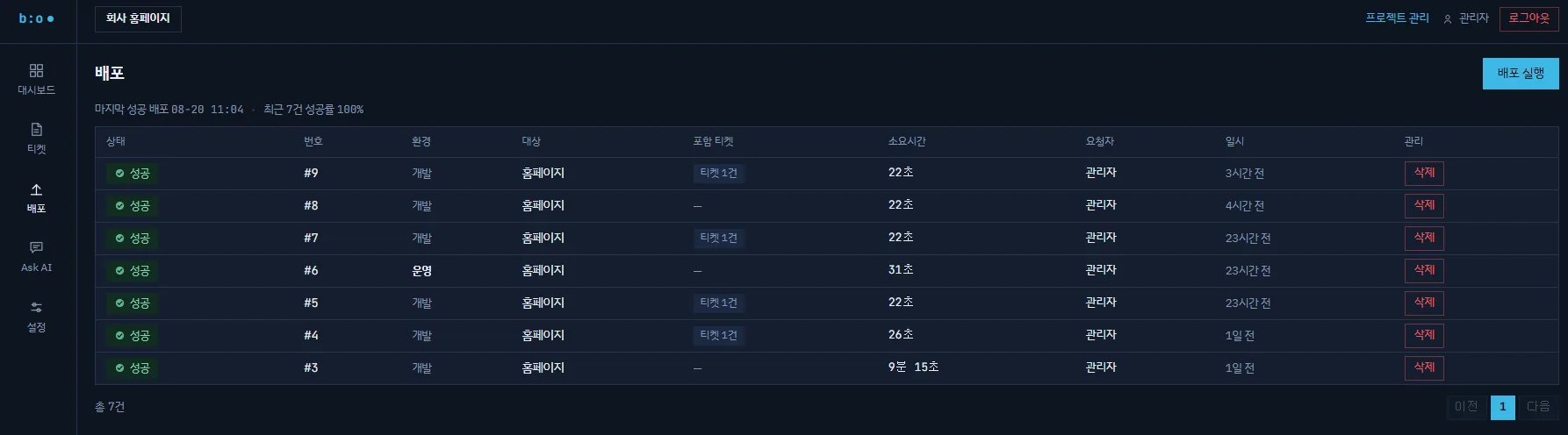
BABEL OPS deployment screen — deployment history by development and production environment, with the included tickets, elapsed time, and requesters
03

Deployment management — Separate development and production rollouts, with history

Deployments run separately for development and production environments, and each deployment is linked to the tickets it applied. The elapsed time, requester, and timestamp of every deployment remain in the history.

  • Deployments separated by development and production environment
  • Ticket-linked deployment with the included tickets shown
  • Elapsed time and requester recorded per deployment
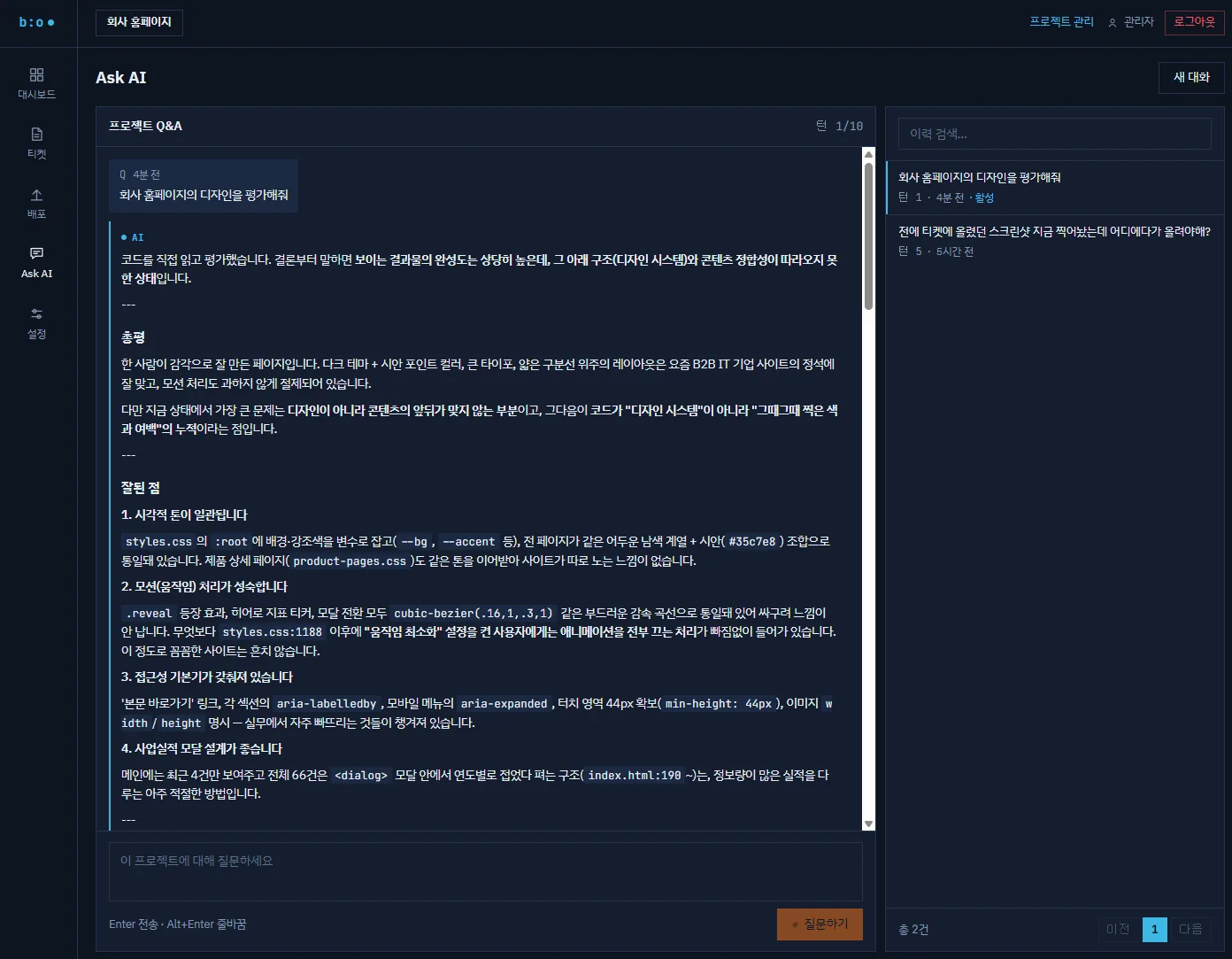
BABEL OPS Ask AI screen — a project Q&A conversation that answers by pointing to files and code locations based on the project source code
04

Ask AI — Q&A grounded in your source code

It answers development and operations questions based on the source code of the project under maintenance. Answers point to the actual files and code locations, and conversation history is saved so it can be searched again.

  • Q&A per project
  • Specific answers down to file paths and code
  • Conversation history saved and searchable
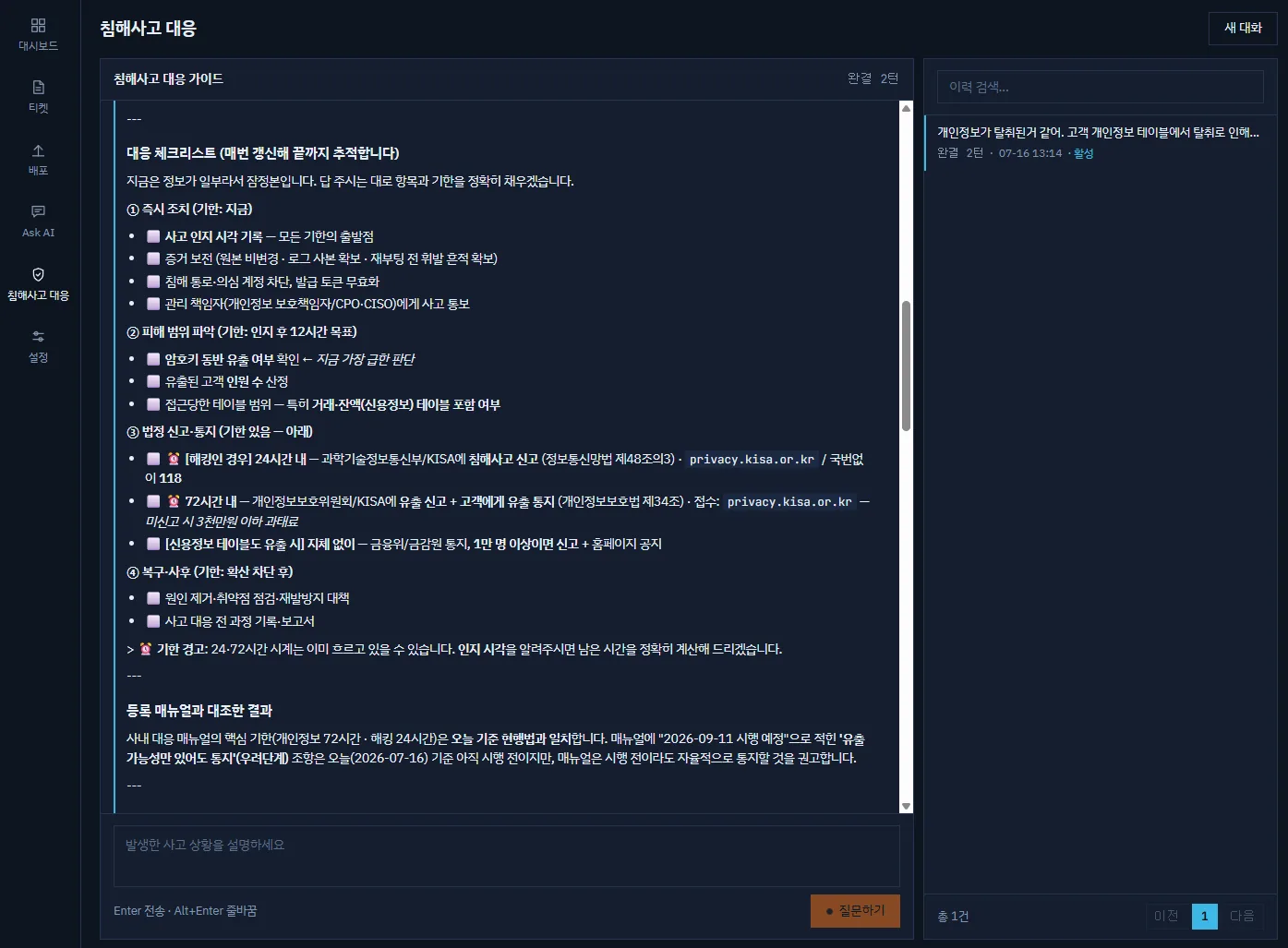
BABEL OPS security incident response screen — a response guide conversation that lays out statutory reporting deadlines and stage-by-stage checkpoints as a checklist
05

Security incident response — Reporting deadlines and checkpoints, organized

Describe the incident and it organizes the statutory reporting deadlines and the items to check into a checklist, supporting your initial response decisions. It also states the relevant legal provisions and where to file the report, and it does not replace legal advice.

  • Reporting and notification deadlines organized
  • A checklist of stage-by-stage checkpoints
  • Relevant legal provisions and filing authorities stated
Project management

Register multiple projects and run each one with its own repository and execution environment.

Environment settings

Set the AI model, repository, and deployment target for each project.

WHO IT SERVES

A fit for organizations that face repetitive system operation requests.

Public institutions

Institutions that need to manage repetitive requests for their websites and business systems in a systematic way

Enterprise operations teams

IT teams that run multiple systems alongside long-term maintenance work

Service platforms

Online services where policy, copy, and feature changes occur continuously

Multi-project organizations

Organizations that need to manage a separate repository and deployment environment for each project

FAQ

Frequently asked questions

Do we have to rebuild our existing systems?

No. You can apply AI to the maintenance flow first, without rebuilding existing systems from scratch. We review the scope and the adoption approach together with you, based on the system environment you are currently running.

Who checks the results of AI handling?

Your team does. Once AI implements a change request as code, your team reviews the result and decides whether to apply it to the target system, then reviews what was applied and either approves it or requests further work.

What kind of organizations is it for?

It suits public institutions that need to manage repetitive requests for their websites and business systems, enterprise IT teams that run multiple systems alongside long-term maintenance work, and online services where copy and feature changes occur continuously.

Can we manage several systems together?

Yes. Register multiple projects and manage them from a single console, with the AI model, repository, and deployment target configured separately for each project.

Repetition to AI, judgment to people.

We review the scope and adoption approach for BABEL OPS together with you, based on the system environment you are currently running.

Contact us about adoption